Sequence database setup: EMBL EST
|
Overview
The EST Fasta files from EMBL contain "single-pass" cDNA sequences, or Expressed Sequence Tags. The sequences are divided into 10 divisions:
| ENV:Environmental Samples | (predefined: Environmental_EST) |
| FUN:Fungi | (predefined: Fungi_EST) |
| HUM:Human | (predefined: Human_EST) |
| INV:Invertebrates | (predefined: Invertebrates_EST) |
| MAM:Other Mammals | (predefined: Mammals_EST) |
| MUS:Mus musculus | (predefined: Mouse_EST) |
| PLN:Plants | (predefined: Plants_EST) |
| PRO:Prokaryotes | (predefined: Prokaryotes_EST) |
| ROD:Rodents | (predefined: Rodents_EST) |
| VRT:Other Vertebrates | (predefined: Vertebrates_EST) |
Using the database in Mascot 2.5 and later
Enable the predefined definition in Database Manager, which will download the required files automatically.
Using the database in Mascot 2.4
Enable the predefined definition in Database Manager to get the latest configuration. Downloading the files will fail, because Mascot 2.4 does not support HTTPS file downloads. Please download the FASTA file and required taxonomy files manually as described below.
Download (Mascot 2.3)
Individual Fasta files can be downloaded from the EBI file server. On this help page, the rodents file is used as an example. To work with other divisions, simply substitute the three letter code. For example, the compressed Fasta file for rodents is est_rod.gz, while the one for fungi is est_fun.gz.
Taxonomy (Mascot 2.3)
Taxonomy for EMBL EST files requires Mascot 2.3 or later. For earlier versions of Mascot, configure without taxonomy. The following taxonomy files are required:
https://ftp.ebi.ac.uk/pub/databases/embl/misc/acc_to_taxid.mapping.txt.gz
https://ftp.ncbi.nlm.nih.gov/pub/taxonomy/taxdump.tar.gz
Note that the taxonomy files go into the taxonomy directory, not into the sequence database directory. Also, some files need to be unpacked (using tar) as well as uncompressed.
The Taxonomy definition block in mascot.dat should be as follows:
# TAXONOMY FOR EMBL EST
Taxonomy_13
Identifier EMBL EST Fasta
Enabled 1 # 0 to disable it
FromRefFile 0
ErrorLevel 0
SpeciesFiles ACC2TAXID:acc_to_taxid.mapping.txt, NCBI:names.dmp
NodesFiles NCBI:nodes.dmp, NCBI:merged.dmp
DefaultRule ACC2TAXID, CHOP: ">EM_EST:\([A-Z0-9]*\)"
GencodeFiles NCBI:gencode.dmp
MitochondrialTranslation 0
end
Unigene
NOTE: UniGene was retired by NCBI in July 2019, although the final UniGene builds are still available as static content from the FTP site
The NCBI UniGene indexes are created by automatically partitioning GenBank sequences into non-redundant sets of gene-oriented clusters. If UniGene indexes are available locally, results from Mascot searches of EST databases can be grouped and reported by gene family, rather than by raw EST accession numbers.
In Mascot 2.4 and later, the following UniGene indexes are included in the predefined database definitions. To enable UniGene indexes in earlier versions, refer to your local copy of this help page
- Environmental_EST
- None
- Fungi_EST
- Dictyostelium_discoideum
- Human_EST
- Homo_sapiens
- Invertebrates_EST
- Anopheles_gambiae
- Caenorhabditis_elegans
- Drosophila_melanogaster
- Mammals_EST
- Bos_taurus
- Canis_lupus_familiaris
- Equus_caballus
- Pan_troglodytes
- Sus_scrofa
- Mus_EST
- Mus_musculus
- Plants_EST
- Arabidopsis_thaliana
- Chlamydomonas_reinhardtii
- Hordeum_vulgare
- Oryza_sativa
- Triticum_aestivum
- Zea_mays
- Prokaryotes_EST
- None
- Rodents_EST
- Rattus_norvegicus
- Vertebrates_EST
- Danio_rerio
- Takifugu_rubripes
- Xenopus_laevis
Parse Rules (Mascot 2.3)
A typical Fasta title line is:
>EM_EST:AA012645 AA012645.1 RPU0101AC Rat myometrium, differential display Rattus …
Suitable parse rules are:
Accession from Fasta title (all databases except ENV) : ">EM_EST:\([A-Z0-9]*\)"
Accession from Fasta title (ENV) : ">EM_ENV:\([A-Z0-9]*\)"
Description from Fasta title (all databases) : ">[^ ]* \(.*\)"
Configuration (Mascot 2.3)
For this example, est_rod.gz was downloaded to a folder named C:\Inetpub\Mascot\sequence\Rodents_EST\current. The file was decompressed using gzip, and renamed to Rodents_EST_109.fasta (because it was from EMBL release 109).
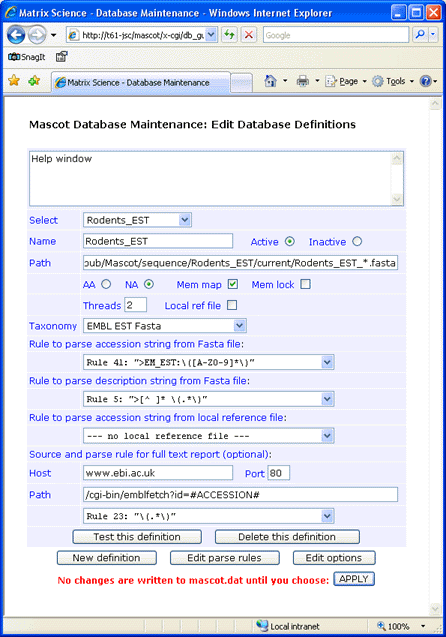
Full text for individual entries can be retrieved across the web from the EBI at www.ebi.ac.uk. The syntax for the Path field is:
/Tools/dbfetch/dbfetch?db=ena_sequence&style=raw&id=#ACCESSION#
(The screen shot shows emblfetch, but this has been discontinued.) If you don’t require full text in a Mascot Protein View report, simply leave the Host, Port, and Path fields blank
and choose
— no full text report —
in the drop down list.
Always test a new definition before applying the changes to mascot.dat.