Sequence database setup: TrEMBL
|
Overview
UniProtKB/TrEMBL (unreviewed) contains protein sequences associated with computationally generated annotation and large-scale functional characterization. About 85 % of the protein sequences in UniProtKB are derived from the translation of coding sequences (CDS) from the EMBL-Bank/GenBank/DDBJ public nucleic acid databases.
UniProtKB is a collaboration between the European Bioinformatics Institute, the Swiss Institute of Bioinformatics and the Protein Information Resource.
Using the database in Mascot 2.5 and later
Enable the predefined definition in Database Manager, which will download the required files automatically.
Using the database in Mascot 2.4
Enable the predefined definition in Database Manager to get the latest configuration. Downloading the files will fail, because Mascot 2.4 does not support HTTPS file downloads. Please download the FASTA file and required taxonomy files manually as described below.
Download (Mascot 2.3)
Expasy:
https://ftp.uniprot.org/pub/databases/uniprot/current_release/knowledgebase/complete/
EBI:
https://ftp.ebi.ac.uk/pub/databases/uniprot/knowledgebase
The EBI site mirrors the Expasy site. The relevant files are:
- Version info: reldate.txt
- TrEMBL Fasta file: uniprot_trembl.fasta.gz
- TrEMBL Dat file: uniprot_trembl.dat.gz
To download TrEMBL updates automatically in Mascot 2.3 and earlier, the relevant definition block in db_update.pl is Trembl_complete_from_EBI.
Taxonomy (Mascot 2.3)
Taxonomy is identical to that for SwissProt, and is predefined in mascot.dat. Even if you have the Trembl Dat file, choose "SwissProt FASTA". In Mascot 2.3 and earlier, verify that the taxonomy definition in mascot.dat is up to date:
# TAXONOMY FOR SwissProt or Trembl from the fasta file
Taxonomy_3
Identifier SwissProt FASTA
Enabled 1
FromRefFile 0
DescriptionLineSep 0
SpeciesFiles NCBI:names.dmp, SWISSPROT:speclist.txt
NodesFiles NCBI:nodes.dmp, NCBI:merged.dmp
DefaultRule SWISSPROT, CHOP: ">[^_]*_\([^ ]*\) "
end
#
Note that mascot.dat must be saved as plain text, so be careful if using a word processor, and ensure the filename is not changed to mascot.dat.txt or something.
The following taxonomy files are required:
https://ftp.ncbi.nlm.nih.gov/pub/taxonomy/taxdump.tar.gz
https://ftp.ebi.ac.uk/pub/databases/uniprot/knowledgebase/docs/speclist.txt
Taxonomy files go into the taxonomy directory, not into the sequence database directory. Also, some files need to be unpacked (using tar) as well as uncompressed.
|
Parse Rules (Mascot 2.3)
A typical Trembl Fasta title line is:
>tr|A0AQI4|A0AQI4_9ARCH Putative ammonia monooxygenase (Fragment) OS=uncultured archaeon GN=amoA PE=4 SV=1
You can use either the ID (A0AQI4_9ARCH) or the AC (A0AQI4) as the identifier.
ID from Fasta title: ">..|[^|]*|\([^ ]*\)"
AC from Fasta title: ">..|\([^|]*\)"
Description from Fasta title: ">[^ ]* \(.*\)"
The corresponding lines in the Dat file are:
ID   A0AQI4_9ARCH              Unreviewed;         206 AA.
AC   A0AQI4;
ID from Ref file: "^ID \([^ ]*\)"
AC from Ref file: "^AC \([-A-Z0-9_]*\)"
Configuration (Mascot 2.3 and earlier)
For this example, the database files were downloaded to C:\Inetpub\MASCOT\sequence\Trembl\current, decompressed using gzip, and renamed to Trembl_39.0.dat and Trembl_39.0.fasta.
When updating an active database, it is important to rename the Fasta file last, because Mascot will begin database exchange as soon as it sees a new Fasta file that matches the wildcard path for the database.
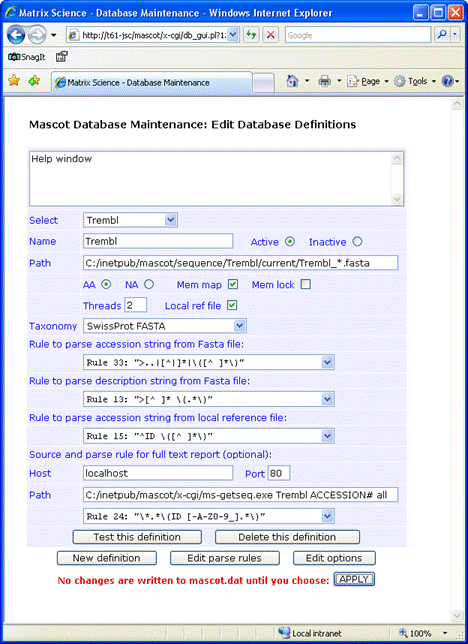
If you decide not to have the reference file locally, full text for individual entries can be retrieved across the web from Uniprot or an SRS server. For Uniprot, the required entries are:
Host: www.uniprot.org
Port: 80
Path: /uniprot/#ACCESSION#.txt
Parse rule: RULE_23 "\(.*\)"
Where #ACCESSION# represents either the AC or ID. For an SRS server, the syntax for the Path field is:
Retrieve by ID: /srsbin/cgi-bin/wgetz?-e+[UNIPROT-id:#ACCESSION#]+-vn+2
Retrieve by AC: /srsbin/cgi-bin/wgetz?-e+[UNIPROT-acc:#ACCESSION#]+-vn+2
This screen shot illustrates a configuration in which the identifier is AC, there is no local Dat file, and full text is retrieved from Uniprot:
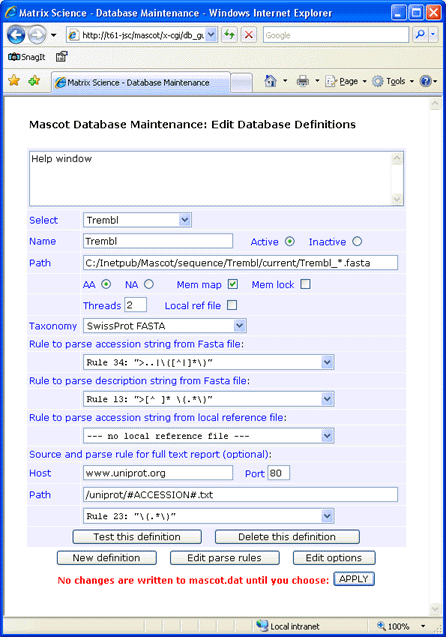
If you don’t require full text in a Mascot Protein View report, simply leave the Host, Port, and Path fields blank
and choose
— no full text report —
in the drop down list.
Always test a new definition before applying the changes to mascot.dat